Saturday, February 28, 2015

Oracle SOA -Payload Size threshold

Oracle JCA Adapters are designed to process large payloads but the BPEL engine consumes huge memory when processing large payloads due to XML conversions which can cause well known OutOfMemory(OOM) and jeopardize the whole system.Setting the payload threshold prevents any data burst from the downstream systems ensuring the JCA Adapters process only payloads that are less than the threshold limit and reject others.

Capping 
the payload size according to  the capacity of the infrastructure in place is always preferred since the servers will take time to recover from OOM error by garbage collection which is a "Stop the World" activity and no requests will be processed by the server during the time.


Maximum Request size for services


The threshold for maximum request size for any exposed service can be set by using this attribute.The value can be set through the EM console by navigating to the service endpoint -> Service/Reference Properties ->Exposed Service. A default value of -1 represents unlimited which can be set in units of bytes,KB,MB or GB to a suitable value that your infrastructure can handle.


This can be restricted at the DMZ level without the requests reaching the web logic servers if the architecture includes any of the below components.


  • Oracle API Gateway
  • Web Server that can restrict request size
  • Load balancer like F5 BIG IP 

payloadSizeThreshold for adapters


Setting the payload threshold ensures that Oracle JCA Adapters rejects payloads greater than the threshold limit. In case of file and FTP adapters when the native size of the payload is not available and if the specific adapter does not use the native translation library, you cannot enforce the payload size threshold limit. For example, in case of xml-debatching, where the Oracle File and FTP Adapters pass a chunk of file content and the actual native size is not known, payload size threshold limit cannot be used.

To set the global property for capping payload size login to the EM console -> soa-infra   -> Administration -> System MBean Browser - > adapter and set the value for DefaultPayloadSizeThreshold . As per the documentation DefaultPayloadSizeThreshold  works only for the inbound adapters.There is no attribute as payloadSizeThreshold which seems to be a bug and DefaultPayloadSizeThreshold works for both inbound and outbound operations.


This threshold can be increased/decreased at adapter service level by overriding the values in composite.xml which takes precedence over the global settings.


 <reference name="insert" ui:wsdlLocation="insert.wsdl">   
 <interface.wsdl interface="http://xmlns.oracle.com/pcbpel/adapter/db/Application3/One2ManyJoining/insert#wsdl.interface(insert_ptt)"/>   
 <binding.jca config="insert_db.jca"/>   
 <property name="payloadSizeThreshold" type="xs:string" many="false" override="may">100</property> </reference>   


Below are some of the options when it is required to process huge data using database  adapter.


  • MaxRaiseSize and MaxTransactionSize can be used while using database polling to restrict the number of records returned from the adapter.
  • Setting the audit level to minimal can enhance  the processing of large data with a drawback of payload not getting saved to the database
  • When processing large payload using XSLT set "streamResultToTempFile" to yes to avoid OutOfMemory error.But assign activities always perform better.
  • Parking Lot pattern can be used to throttle the messages processed.See Throttling in SOA Suite via Parking Lot Pattern at http://www.ateam-oracle.com/throttling-in-soa-suite-via-parking-lot-pattern/  for how to implement in SOA.
Other adapters like AQ,MQ,File,FTP etc... have their own parameters that can be tweaked to control the payload size when used for inbound operations.

Thursday, February 12, 2015

Zero Sign-On (ZSO) or IWA for IIS 8 applications using OAM11GR2

Both  Zero Sign-On (ZSO) and Single Sign-On (SSO) means that user has one username and password (e.g.Active Directory username and password) for the SSO enabled application but ZSO  authenticates seamlessly without prompting for a username and password using  the desktop credential which is achieved using kerberos protocol.Below are the steps to configure ZSO for .NET websites running on IIS server using Oracle access manager.


Environment

OAM :11.1.2.2.0 
Web server:IIS 8 on Windows Server 2012 R2 
Webgate: 11.1.2.2.0

Prerequisite

  • Install Visual C++ Redistribution for Visual Studio 2012 Update 4 or else the files will not be copied properly during installation
  • Install a 64-bit Java runtime environment (JRE), 1.6 or higher  
  • It is recommended to run the command prompt as administrator and execute all the scripts
  • Make sure to provide full access for the middleware home and the webgate instance folders.
  • Make sure the site is deployed on IIS server and able to list  using the command. 
      %systemroot%\System32\inetsrv>appcmd.exe list sites 


Installing IIS 11g WebGate

Extract the contents of the webgate.zip file to a directory, Go to the Disk1 and run the below command.

setup.exe -jreLoc 64_bit_jre_location


Click Next to continue.


Click Next to continue.


Specify the Middleware Home and Oracle Home locations.


Click Install to begin the installation.


Click Finish to dismiss the Installer.


To deploy the WebGate instance , Go to the webGate_Oracle_Home\webgate\iis\tools\deployWebGate  directory and run the following command

deployWebGateInstance.bat -w WebGate_Instancedir -oh WebGate_Oracle_Home -ws WebServer


To run the ConfigureIISWebGate.bat tool,go to the WebGate_Home\webgate\iis\tools\ConfigureIISConf and run the below command. 


ConfigureIISWebGate.bat -oh c:\WGHome -w c:\WGInstance -site "mysite"


Make sure the webgate.ini has some entry as below for the registered web gate instance.19 represents the site id protected by the access gate.


Also make sure the ISAPI filters are added pointing to the webgate.dll as below.


Register the WebGate using RREG

The web gate registration can be done from the OAM console or the rreg scripts. For registering using the scripts navigate to OAM_REG_HOME/bin and execute the below command.

$ ./oamreg.sh inband input/test_OAMRequest.xml 

Copy the files generated in the RREG_Home\output\Agent_ID  to the WebGate_Instance_Home\webgate\config directory

Make sure the sso agent is registered as 11g webgate.

Configure OAM to use WNA

  • Create a  user in Microsoft Active Directory for example oamuser.


  • Run ktpass on the KDC server to create the SPN (service principal name)  and associate it with this user. For example


ktpass -princ HTTP/myhost.mydomain.com@DOMAIN.COM -pass ***** 
-mapuser oamuser -out D:\etc\oam.keytab

where myhost.mydomain.com is the FQDN of the host where access manager is running or the host name of the loadbalancer VIP in case of OAM cluster.

  • Edit the /etc/krb5.conf file to include the domain and the KDC server.


  • Configure the Kerberos authentication scheme to use WNA by Logging in to the OAM console ->Launch Pad ->Authentication schemes >KerberosScheme and change the challenge method to WNA


  • Login to the OAM console ->Launch Pad ->Authentication Modules >Kerberos and change the default values to the actual values.


  • Configure the application domain protecting the resource to use the Kerberos authentication scheme.


  • Register the active directory as the identity store and make this as the primary user identity store for Oracle Access Manager.


After you start the IIS Web Server (iisreset), log in to the site by using the following URL without entering any credentials.

http://myhost.domain.com:port

Wednesday, January 21, 2015

Oracle SOA Suite - SAML Authentication with Message Protection

In this blog we will go through the steps required to protect a SOA composite service using a basic SAML authentication and message protection.Message protection involves encrypting the message for message confidentiality and signing the message for message integrity. We will be using the predefined OWSM policy "wss11_saml20_token_with_message_protection_service_policy" as our  server policy. 

By default Messages are protected using WS-Security's Basic 128 suite of symmetric key technologies, specifically RSA key mechanisms for message confidentiality, SHA-1 hashing algorithm for message integrity, and AES-128 bit encryption. If you would like to override any of these defaults take a copy of the policy and override the defaults.The default is to sign and encrypt the entire body for the request the response. You have the option to not do this and to instead specify the specific body elements that you want to sign and encrypt. You can also additionally specify header elements that you want to sign and encrypt. 


We have created a simple SOA composite project using mediator which just echoes the request and attached the policy to that.


Creating Keystore

For any message protection security policies to work  key stores need to be configured which contains the private keys and the certificates associated with those private key.We will be using JKS keystore which is a single OWSM keystore per domain and will be  shared by all Web services and clients running in the domain.

For demonstration purpose we will be using keytool to generate a self signed certificate and use it for our configurations.

keytool -genkeypair -v -keypass ******* -storepass oracle123 -alias orakey -keystore mykeystore.jks -keyalg rsa -keysize 2048 -storetype jks -dname 'CN=SOAtest,C=AE' -validity 365

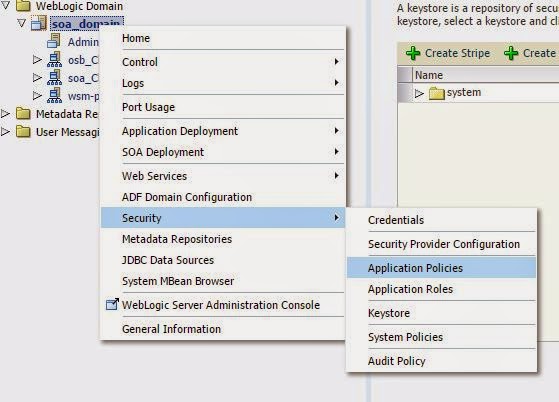
To configure the keystore login to EM > Weblogic Domain >Web service>Security Provider Configuration > Keystore> Configure


Provide the absolute path of the JKS file if it is not kept in the default location and enter the alias for signature key and encryption key and the respective passwords.When  OWSM  is configured to use the JKS keystore, entries are created in the credential store for the credential map oracle.wsm.security.You must store the password for the decryption key.


Create user in Weblogic

The user in SAML token should be a valid weblogic user. Create the user by logging in to web logic administration console > Security Realms >my realms >Users and Groups and then Users

Server restart is required for the JKS configuration.

Testing the Policy using a Web Service Client

The Web service's base64-encoded public certificate is published in the WSDL for use by the Web service client.Attach a copy of wss11_saml20_token_with_message_protection_client_policy to your Web service client while creating a proxy. Here is a piece of sample code to get started. Tools like TCPMon can be used to intercept requests and see the encryption in action.


 public class Execute_ptClient  
 {  
  @WebServiceRef  
  private static Service1 service1;  
  public static void main(String [] args)  
  {  
   service1 = new Service1();  
     SecurityPoliciesFeature securityFeatures =  
       new SecurityPoliciesFeature(new String[] { "oracle/wss11_saml20_token_with_message_protection_client_policy" });     
     Execute_ptt execute_ptt = service1.getExecute_pt(securityFeatures);  
      Map<String,Object> req=((BindingProvider)execute_ptt).getRequestContext();  
      req.put(BindingProvider.USERNAME_PROPERTY, "samluser");  
      req.put(BindingProvider.PASSWORD_PROPERTY, "*******");  
      req.put(ClientConstants.WSSEC_KEYSTORE_TYPE,"JKS");  
      req.put(ClientConstants.WSSEC_KEYSTORE_LOCATION, "C:\\op\\cert\\mykeystore.jks");  
      req.put(ClientConstants.WSSEC_SIG_KEY_ALIAS,"orakey");  
      req.put(ClientConstants.WSSEC_KEYSTORE_PASSWORD,"*******");  
      ObjectFactory of=new ObjectFactory();  
      execute_ptt.execute(new Holder<String>("hi"));  
      System.out.println("Success");  
  }  
 }  

Monday, January 12, 2015

Oracle SOA - Changing host name or domain name

We had a requirement  to change the network configurations like host name and domain name of the SOA infrastrucutre and startup the servers with new names.This is a SOA 12C environment with  Admin server and seperate managed servers for SOA,OSB,ESS,BAM running on this machine.

Login to the admin console and perform the following steps.

1.Create a new machine pointing to the new host.Alternately you can clone the existing machine and rename to the new one and delete the old machine if its no more required.Add all the servers including the admin server to the newly created machine.(In the Domain Structure section click on Machines > MyMachine >Servers >Add >Select an existing server).

2.If the managed servers are running with different Virtual hostnames the listen address needs to be changed for each and every server.(In the Domain Structure section click Servers > server1 > General > Listen Address and change the host names )

Change the MDS datasources if required.


  • In the Change Center, click Lock & Edit.
  • In the Domain Structure section, expand Services, then JDBC, and select Data Sources.
    The Summary of JDBC Data Sources page is displayed.
  • Select the data source you want to change.
    The Settings page is displayed.
  • Select the Connection Pool tab.
  • To change the IP address, modify the URL field. For example:
    jdbc:oracle:thin:@hostname.domainname.com:1521/orcl
    
  • Click Save.
Repeat the steps for all the MDS related datasources and a server restart is required for the update.
Below files had some references to the old host names which needed for a find and replace.Take a backup of the files and do a search and replace.
$ vi filename
$%s/oldhost/newhost

  • config.xml($DOMAIN_HOME/config)
  • wsm-ccw-config.xml($DOMAIN_HOME/config/fmwconfig)
  • jps-config.xml($DOMAIN_HOME/config/fmwconfig)
  • jps-config-jse.xml($DOMAIN_HOME/config/fmwconfig)
  • stopWeblogic.sh($DOMAIN_HOME/bin)
  • stopManagedWeblogic.sh($DOMAIN_HOME/bin)
  • startManagedWeblogic.sh($DOMAIN_HOME/bin)
Search through the directories for any left over references as below and replace them.

$grep -inr /directory -e "oldhost" --exclude *.log*

Before  starting  the node manager change the hostname in the node manager.properties file.

ListenAddress=newHost

In SOA 12C the location of the property file is $DOMAIN_HOME/nodemanager by default or the custom path if changed during installation.

If the admin server is not running on local host and running with a different host name which also got changed you will not be able to start the admin server. In that case the host name should be changed before the server is shut down. If its a clone from existing server, the admin server will need to be brought up with old host name to access the console and change the host names. 

Saturday, December 6, 2014

Weblogic - List running instances

Unix-List all instances of weblogic instances running on a server

At times we need to find the weblogic instances which are up and running on a particular machine mostly in clustered environments. This might be required to figure out weblogic process from a particular domain and kill that process.

You can do a grep as below which gives all the Java processes running on the machine and it may be tough to correlate PID with the running server instances.

$ps -ef | grep java 

Below shell script can be handy to list down the servers running on a particular machine.

clear
echo "PID and  webLogic instances"
echo  "**************************************"
/usr/ucb/ps -awwx | grep "weblogic.Name" | grep -v "grep weblogic.Name" | nawk 'BEGIN {print "PID\tWeblogicServer";
print  "**************************************" } ;
        {
        NUM = match($0, "weblogic.Name=") ;
        START_POS  = RSTART+RLENGTH ;
        START_STR = substr($0, START_POS) ;
        FINISH = match(START_STR, " ") ;
        FINISH_POS = START_POS+RSTART+RLENGTH ;
        FINISH_STR = substr($0, START_POS, FINISH_POS) ;
        NUM = split(FINISH_STR,FINISH_ARRAY) ;
        printf ("%s\t%s\n",$1, FINISH_ARRAY[1]) ;
        }
        END {
        print "**********************************"}'

Below is a sample output.

PID and  webLogic instances
**************************************************
PID     WeblogicServer
**************************************************
12624   AdminServer
13367   wls_soa1
13369   wls_wsm1
**************************************************


To stop a particular server issue the below.
$ kill -9 PID
If it's admin server,to avoid the conflict of existing .lok and .DAT files you can remove the tmp and cache folders or rename them.

Another handy way to find the running process will be using the jps script in the java bin folder. For example navigate to /usr/local/java/bin and run $jps -v which gives the server name in the parameter weblogic.Name  as below.


Sunday, November 30, 2014

OID - Active Directory Child Domain synchronization using Oracle Directory Integration Platform

It is required to use Oracle Internet Directory(OID) as LDAP directory for implementing SSO for Oracle products like EBS using Oracle Access Manager.If you are using any other LDAP servers like Microsoft Active directory across the enterprise it will be required to use Oracle Directory Integration Platform for synchronizing the directories.

If all the users from the third party directory are not required into OID we can use filters like AD groups and make use of the filtering in the DIP synchronization profiles to bring in the selected users.If the AD you are connecting to is a global catalog server rather than the child domain with a referral the users from the child domain is expected to get synced to the OID.But if it is a referral child domain ldap search will fail with below error.

$ORACLE_HOME/bin/ldapsearch -h ADhost -p port -D "admin@mydomain.com" -w welcome1 -b "cn=users,dc=child1,dc=mydomain,dc=com" -s sub"objectclass=*"

ldap_search: LDAP Referral Error
ldap_search: additional info: 0000202B: RefErr: DSID-0310063C, data 0, 1 access points 

ref 1: 'child1.mydomain.com' 

If there is no global catalog server the solution for this will be to create a new synchronization profile in DIP pointing to the child domain directly.This can be targeted to the new container in OID or a new one.The ldapsearch query can be run against the child Domain controller to verify if all the user accounts of interest including all attributes and values that will be synchronized are pulled in the query using the filter if any.

$ORACLE_HOME/bin/ldapsearch -h ChildADhost -p port -D "admin@mydomain.com" -w welcome1 -b "cn=users,dc=child1,dc=mydomain,dc=com" -s sub"objectclass=*"


To manually create the AD OID integration profile and setup the synchronization perform the below steps


  • Launch the FMW Enterprise Manager console and login with weblogic user.
  • Expand your domain and Navigate to Identity and Access
  • Select DIP
  • From the DIP Server drop down list select Administration , then Synchronization Profiles
  • Using the navigation path, create a new DIP Sync profile with a name , you can give your name.For Example take it as AD2OID is the integration profilename , in this window you'll be asked to enter the AD details
  • For the attribute Use DIP-OID as Source or Destination , you need to select the option Destination if you are using import (AD to OID) sync or select Sourceoption if you are using Export (OID to AD) sync. Also source type you need to select Active Directory(MS) from the drop down next type.
  • After Providing the above mentioned details in the general tab click on Test Connection Tab, If the provided values are correct you'll see the Information dialogue saying that "Test Passed.Connection Successful". If the values provided for AD are wrong in the General tab , when you click on the Test Connection, you will get an Error dialogue saying Authentication Failure,Make sure that you provide the correct values and get connection Successful to move Further
  • Then Click on OK to Save the profile.Now select the AD2OID profile from the list of available profiles and click on Edit.
  • Now select the Mapping tab and configure mapping like below
Configure Domain Rules Click on Create option, You'll get a Add Mapping Rule Window , in that Select the Source Container DN and OID container DN from the lookup windows provided and click on OK. 

Validate / re-Validate mapping until you have no errors, warnings are OK

Make sure the user account used has read access privileges to the sub tree root.


Saturday, November 22, 2014

Configure SSL between SOA composite and external services

We had a requirement of configuring two way SSL between the SOA composite and the external services and below are the steps used to  import the partner's public cert into the trusted keystore used by SOA.

The default trusted keystore for SOA is DemoTrust.jks which is located in $MW_HOME/wlserver_10.3/server/lib directory.

For generating a custom keystore use the below  command from $MW_HOME/wlserver_10.3/server/lib or the default JKS can be used.

keytool -genkey -alias mykey -keyalg "RSA" -sigalg "SHA1withRSA" -dname "CN=soa, C=AE" -keystore customcerts.jks -storepass xxxxx 

Download the security certificate from the below URL and  Save as type “X.509 Certificate(PEM)” and name the file as “xxxxx.crt”

Import the public certificate into your own trusted keystore using the below command.

-bash-4.1$ keytool -import -alias taleo -keystore customcerts.jks -file ../cert/xxxx.crt
Enter keystore password:  ****
Re-enter new password: *****
Owner: CN=*.taleo.net, OU=Comodo PremiumSSL Wildcard, OU=Web, O=Taleo Inc., STREET=4140 Dublin Boulevard, STREET=Suite 400, L=Dublin, ST=CA, OID.2.5.4.17=94568, C=US
Issuer: CN=COMODO High-Assurance Secure Server CA, O=COMODO CA Limited, L=Salford, ST=Greater Manchester, C=GB
Serial number: 99faa8037a4eb2faef84eb5e55d5b8c8
Valid from: Wed May 04 04:00:00 GST 2011 until: Tue Jul 05 03:59:59 GST 2016
Certificate fingerprints:
         MD5:  D3:27:02:09:99:85:0B:7C:C2:36:3D:36:21:45:DC:02
         SHA1: 33:67:A1:82:4A:60:13:C0:2A:3E:25:BB:E4:DA:86:33:87:FA:F1:34
         SHA256: 95:CB:44:39:34:BE:DA:97:62:76:88:54:61:91:AB:1D:39:89:A8:35:59:2C:EB:DD:24:34:F9:AD:41:32:4C:E1
         Signature algorithm name: SHA1withRSA
         Version: 3

Extensions:

#1: ObjectId: 1.3.6.1.5.5.7.1.1 Criticality=false
AuthorityInfoAccess [
  [
   accessMethod: caIssuers
,
   accessMethod: ocsp
   accessLocation: URIName: http://ocsp.comodoca.com
]
]

#2: ObjectId: 2.5.29.35 Criticality=false
AuthorityKeyIdentifier [
KeyIdentifier [
0000: 3F D5 B5 D0 D6 44 79 50   4A 17 A3 9B 8C 4A DC B8  ?....DyPJ....J..
0010: B0 22 64 6B                                        ."dk
]
]

#3: ObjectId: 2.5.29.19 Criticality=true
BasicConstraints:[
  CA:false
  PathLen: undefined
]

#4: ObjectId: 2.5.29.31 Criticality=false
CRLDistributionPoints [
  [DistributionPoint:
]]

#5: ObjectId: 2.5.29.32 Criticality=false
CertificatePolicies [
  [CertificatePolicyId: [1.3.6.1.4.1.6449.1.2.1.3.4]
[PolicyQualifierInfo: [
  qualifierID: 1.3.6.1.5.5.7.2.1
  qualifier: 0000: 16 1D 68 74 74 70 73 3A   2F 2F 73 65 63 75 72 65  ..https://secure
0010: 2E 63 6F 6D 6F 64 6F 2E   63 6F 6D 2F 43 50 53     .comodo.com/CPS

]]  ]
]

#6: ObjectId: 2.5.29.37 Criticality=false
ExtendedKeyUsages [
  serverAuth
  clientAuth
]

#7: ObjectId: 2.5.29.15 Criticality=true
KeyUsage [
  DigitalSignature
  Key_Encipherment
]

#8: ObjectId: 2.5.29.17 Criticality=false
SubjectAlternativeName [
  DNSName: *.taleo.net
  DNSName: taleo.net
]

#9: ObjectId: 2.5.29.14 Criticality=false
SubjectKeyIdentifier [
KeyIdentifier [
0000: A2 76 09 20 A8 40 FD A1   AC C8 E9 35 B9 11 A6 61  .v. .@.....5...a
0010: FF 8C FF A3                                        ....
]
]

Trust this certificate? [no]:  y
Certificate was added to keystore.

If default DemoTrust.jks is not used add the generated keystore file(.jks) and the property named "-DUseSunHttpHandler=true" to "setDomainEnv.sh" as mentioned in the below sample:

  
  set EXTRA_JAVA_PROPERTIES=%EXTRA_JAVA_PROPERTIES% -Dsoa.archives.dir=%SOA_ORACLE_HOME%\soa -Dsoa.oracle.home=%SOA_ORACLE_HOME% -Dsoa.instance.home=%DOMAIN_HOME% -Dtangosol.coherence.clusteraddress=227.7.7.9 -Dtangosol.coherence.clusterport=9778 -Dtangosol.coherence.log=jdk -Djavax.xml.soap.MessageFactory=oracle.j2ee.ws.saaj.soap.MessageFactoryImpl -Dweblogic.transaction.blocking.commit=true -Dweblogic.transaction.blocking.rollback=true -Dweblogic.security.SSL.ignoreHostnameVerification=true -Dweblogic.webservice.client.ssl.strictcertchecking=false -Dweblogic.security.SSL.enforceConstraints=off -Dssl.debug=true -Djavax.net.ssl.trustStore=%WL_HOME%\server\lib\opinionmeter.jks -Djavax.net.ssl.trustStorePassword=opinionmeter -Dweblogic.security.SSL.verbose=true -DUseSunHttpHandler=true

  
  set EXTRA_JAVA_PROPERTIES=%EXTRA_JAVA_PROPERTIES% -Dem.oracle.home=C:\Wls_10.3.6\Middleware\oracle_common -Djava.awt.headless=true -DUseSunHttpHandler=true

  set JAVA_OPTIONS=%JAVA_OPTIONS% %JAVA_PROPERTIES% -Dwlw.iterativeDev=%iterativeDevFlag% -Dwlw.testConsole=%testConsoleFlag% -Dwlw.logErrorsToConsole=%logErrorsToConsoleFlag% -DUseSunHttpHandler=true

Restart the servers.

Below are the commands to delete the existing certificate and import again.

keytool -list -keystore opinionmeter.jks -storepass *****
keytool -delete -alias xxx -keystore v.jks -storepass *****
keytool -import -alias xxx -file xxxx.cer -keystore c.jks -storepass  *****

If the certificate is not imported properly below error will be seen.

Message send failed: sun.security.validator.ValidatorException: PKIX path building failed: sun.security.provider.certpath.SunCertPathBuilderException: unable to find valid certification path to requested target

To route the request through proxy server and use ssl set the below in the service reference in composite.xml

<property name="oracle.webservices.proxyHost" type="xs:string"
                many="false">10.xxx.xx.x</property>
 <property name="oracle.webservices.proxyPort" type="xs:string"
                many="false">80</property>
  <property name="oracle.soa.two.way.ssl.enabled">true</property>